Researched and edited with AI assistance. Editorial responsibility: Julian Dominic Altmann. Sources checked November 8, 2026. No first-party MacBook or LLM throughput testing was performed.
Yes: a MacBook Pro can be an excellent AI development machine. It is well suited to applications using hosted models, agents, retrieval-augmented generation, local LLM inference and supported fine-tuning. It is much less suited to workflows that require native CUDA kernels or large distributed training clusters. The limitation is chiefly ecosystem compatibility, not an absence of GPU acceleration on macOS. Apple: PyTorch on Metal · NVIDIA CUDA
The useful question is not simply whether an M6 or M5 Max is faster. It is whether your specific project needs a local model, whether its runtime supports Apple Silicon and how much memory the model actually consumes. This guide provides a local API example, a repeatable inference measurement and a workflow decision framework. For purchase configurations, see our separate MacBook AI buying guide.
Which AI development tasks work well?
| Development task | MacBook Pro fit | Limiting factor |
|---|---|---|
| Building apps with hosted AI APIs | Excellent | Software tooling and network |
| Coding agents and tool orchestration | Excellent | Context processing and latency |
| RAG and embedding pipelines | Excellent | RAM, index size and storage |
| Local LLM inference | Good to excellent | Model, runtime, memory and context |
| Conventional machine learning | Excellent | Framework-specific support |
| MLX-LM LoRA and QLoRA | Model-dependent | Architecture, memory, batch size |
| CUDA kernels and large GPU clusters | Poor as a local execution target | NVIDIA CUDA requirements |
These are development-oriented judgments, not head-to-head benchmark results. A powerful local GPU often delivers little benefit to an application that sends every inference request to a hosted API.
Why unified memory helps local inference
Apple Silicon’s CPU and GPU share one pool of memory. MLX can use data across these devices without requiring the same CPU-RAM-to-discrete-VRAM transfers found in conventional desktop architectures. MLX unified memory documentation
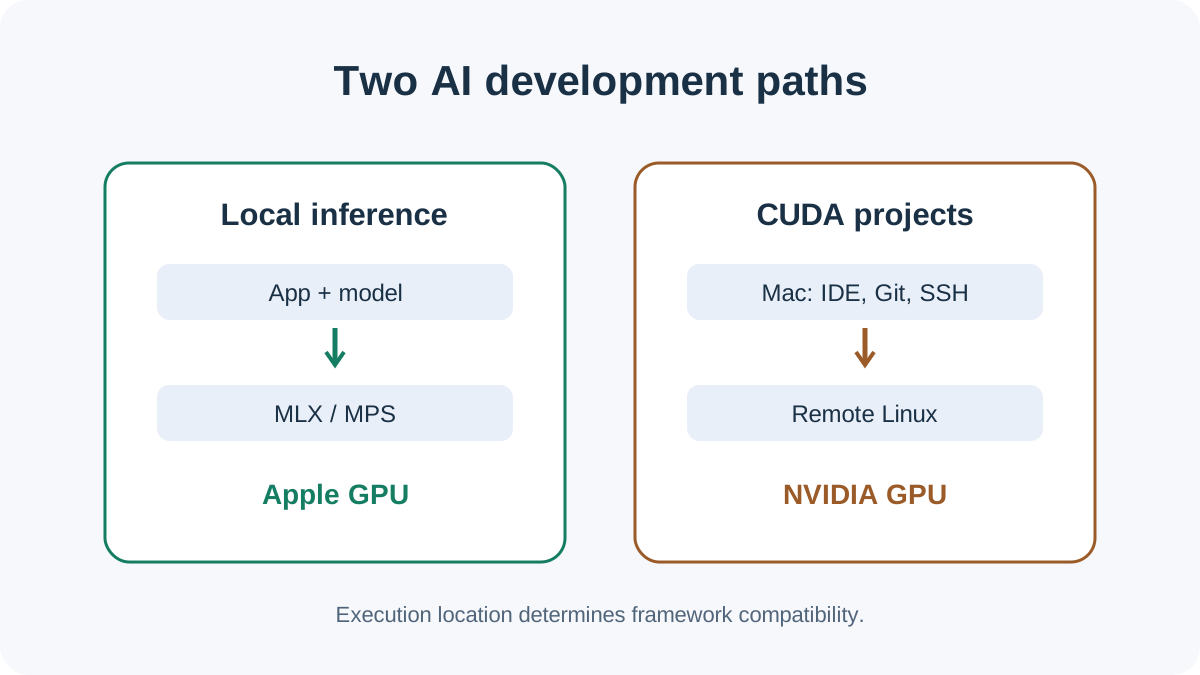
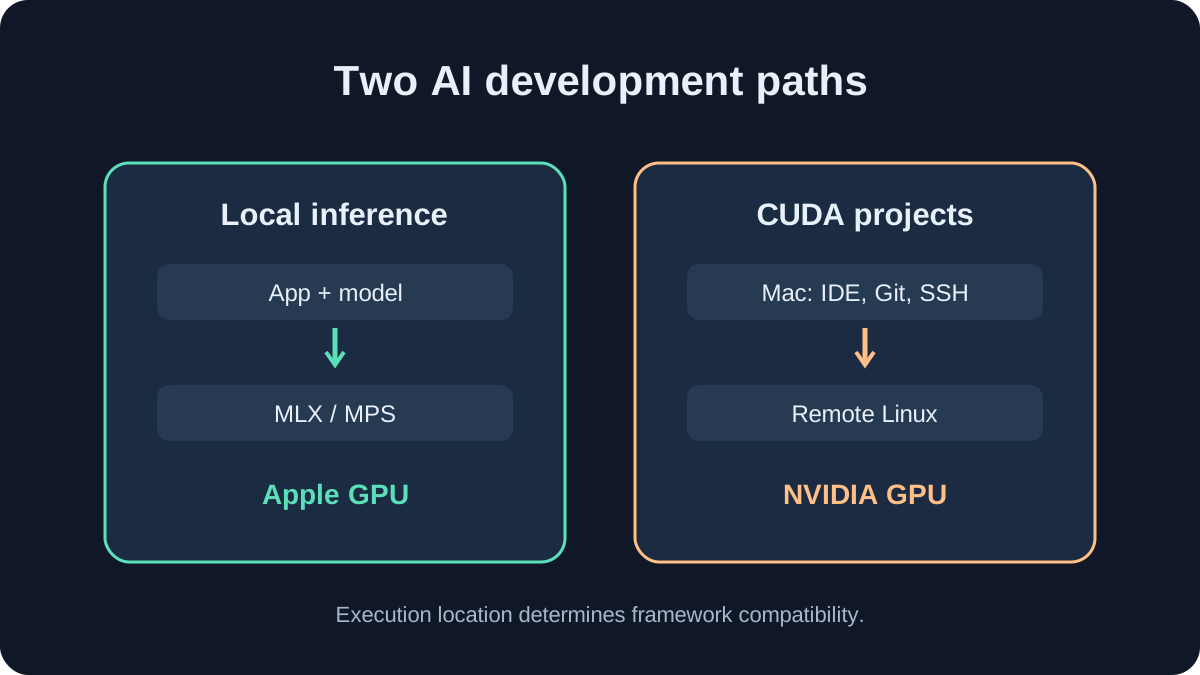
But unified memory is not the same as having the full installed capacity available to model weights. macOS, the IDE, browser, runtime buffers and KV cache all compete for space. Long contexts and concurrent requests increase memory demand.
An idealized lower bound for dense 4-bit model weights is:
Weight storage in decimal GB = parameter count in billions × 4 / 8
| Dense model | Theoretical 4-bit weights |
|---|---|
| 8B | 4 GB |
| 14B | 7 GB |
| 32B | 16 GB |
| 70B | 35 GB |
Calculated lower bounds, not real runtime allocations. Quantization metadata, mixed-precision tensors, runtime, KV cache and OS memory are excluded.
A 70B checkpoint with a theoretical 35GB weight footprint does not necessarily run comfortably on every 48GB Mac. Our local LLM memory guide covers context and headroom in more detail.
M6 versus M5 Pro versus M5 Max for developers
| MacBook Pro chip | Maximum memory | Bandwidth |
|---|---|---|
| M6 | 32 GB | 170 GB/s with 24/32GB |
| M5 Pro | 64 GB | 307 GB/s |
| M5 Max, 32-core GPU | 36 GB | 460 GB/s |
| M5 Max, 40-core GPU | 128 GB | 614 GB/s |
Official Apple maximum specifications, checked November 8, 2026. The 16GB M6 configuration is rated at 153GB/s; options differ by GPU bin. M6 specifications · M5 Pro/Max specifications
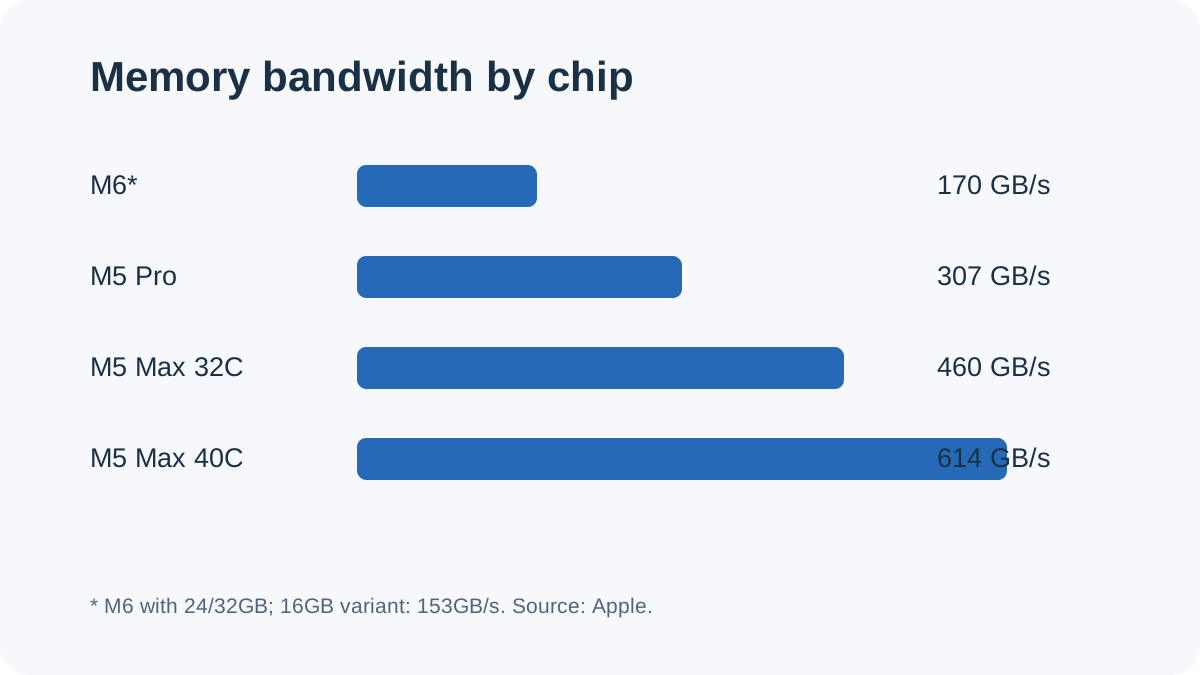
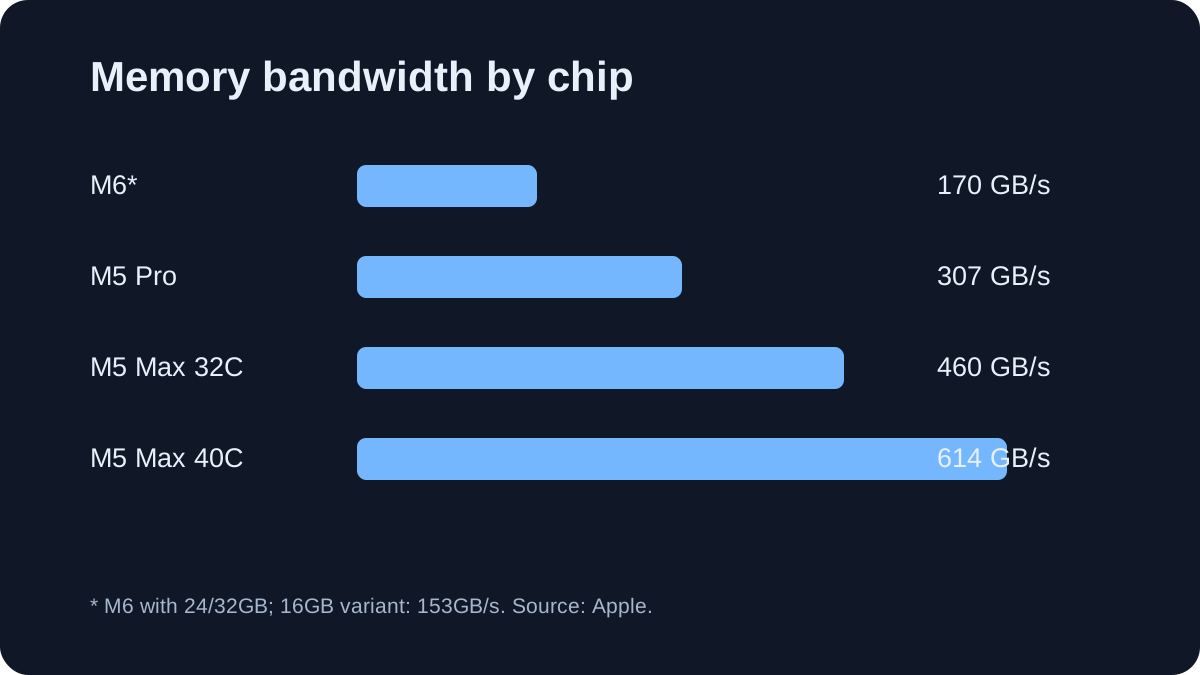
For hosted-model applications and smaller local experiments, 24–32GB can be plenty. An M5 Pro with 48GB or 64GB provides more headroom for local models, a browser, IDE and retrieval services at the same time. An M5 Max with 128GB targets much larger local models, but capacity by itself does not establish inference speed.
Important configuration trap: the 32-core-GPU M5 Max is limited to 36GB; 48GB, 64GB and 128GB options belong to the 40-core-GPU variant. Apple technical specifications
The M6 launched in November 2026, but the newer number does not make a 32GB configuration preferable to a 64GB Pro for every local model. Check capacity first; then benchmark the specific runtime and target model.
MLX, PyTorch MPS and the local model ecosystem
MLX is Apple’s machine-learning framework built around Apple Silicon. It supports automatic differentiation and GPU computation. MLX-LM adds supported LLM inference, quantization and parameter-efficient fine-tuning.
PyTorch MPS brings familiar PyTorch code onto Apple’s GPU using Metal Performance Shaders. It is valuable for coursework, model experiments and smaller training jobs, but it does not make CUDA-specific extensions magically compatible. Check unsupported operators and backend behavior before committing to a training stack. PyTorch MPS notes
A minimal device check:
import torch

device = torch.device(
    "mps" if torch.backends.mps.is_available() else "cpu"
)
print("Device:", device)
This confirms the available backend, not that all operations of a given model execute on the GPU.
For application development, Ollama and LM Studio are often quicker ways to test local models through an HTTP service. Ollama introduced an MLX-backed Apple Silicon path in preview on March 30, 2026. The exact engine, supported models and configuration should be checked against the installed release. Ollama announcement · LM Studio local server
The vLLM Metal project also exists, but its compatibility matrix must be treated separately from the CUDA-focused vLLM ecosystem.
Build a local AI API integration
You do not need a 128GB MacBook to begin. A small quantized model is enough to test prompt handling, API calls and application logic.
Install Ollama from its official site, start its service and download the public Qwen3:4B checkpoint. The published Q4_K_M download is roughly 2.5GB; runtime memory use is higher.
ollama pull qwen3:4b
curl -s http://localhost:11434/api/chat \
  -H "Content-Type: application/json" \
  -d '{
    "model": "qwen3:4b",
    "messages": [
      {"role": "user", "content": "Explain a Python decorator."}
    ],
    "stream": false
  }'
The request is processed by your local Ollama server if it is running and the model is available. This interface can sit behind a coding assistant, internal document search or prototype agent.
A locally executed model does not mean the complete application is offline: connected services, external tools, downloads and telemetry must be assessed separately.
Measure inference speed without misleading comparisons
Decode tokens per second is useful, but it is not the whole story. Prefill throughput measures how fast a long input is processed; time to first token measures responsiveness; decode throughput measures output generation.
For agentic development, long repository inputs and repeated context preparation may matter more than a short-prompt token-rate headline.
Ollama’s Generate API returns generated-token count and evaluation duration in nanoseconds. A basic decode rate can be calculated from those fields. Ollama API documentation
curl -s http://localhost:11434/api/generate \
  -H "Content-Type: application/json" \
  -d '{
    "model": "qwen3:4b",
    "prompt": "Explain binary search.",
    "stream": false,
    "options": {"num_predict": 256, "temperature": 0}
  }' | python3 -c '
import json, sys
r = json.load(sys.stdin)
n, t = r.get("eval_count", 0), r.get("eval_duration", 0)
print(f"{n * 1e9 / t:.1f} tokens/s" if t else "No valid timing")
'
This is a repeatable first measurement, not an editorially measured MacBook Pro result. For a fair comparison, document model digest, quantization, context window, runtime version, warm-up, repeat count and thermal conditions.
The independent Jacar Apple Silicon benchmark dataset publishes M5 Max numbers for identified oMLX versions and model configurations. Those figures are useful reference points but are not transferable to arbitrary models, contexts or execution engines.
Training and fine-tuning: the real boundary
A MacBook Pro can train smaller neural networks through appropriate frameworks. For compatible language models, MLX-LM documents LoRA and QLoRA workflows, which update a limited number of trainable parameters instead of the full base model. The practical limit depends on architecture, batch size, sequence length and memory. MLX-LM fine-tuning
Full training of large LLMs is fundamentally different. Beyond model weights, training needs gradients, activations and optimizer state, as well as substantial sustained compute capacity. Research projects based on custom CUDA kernels and distributed NVIDIA-GPU systems are more naturally executed on Linux/NVIDIA infrastructure. NVIDIA CUDA
A MacBook can still serve as the editor, Git client and SSH workstation while CUDA jobs run remotely.
Active cooling gives the MacBook Pro an advantage over a fanless MacBook Air under sustained loads, but it is not unlimited. Notebookcheck’s independent 16-inch M5 Max review documents thermal and power limits during intensive workloads. These are external observations, not in-house tests.
A practical buying decision
For hosted APIs and software agents, test your existing computer first. A faster GPU is rarely the first constraint in API orchestration or web development.
For regular local LLM development, start with a model shortlist and a realistic context target. An M5 Pro with 48GB or 64GB is a flexible configuration rather than a universal minimum.
For large local checkpoints, consider an M5 Max with 128GB only after confirming weight format, cache size, runtime support and acceptable speed.
For CUDA-oriented research, use the MacBook for development, then run GPU kernels and training jobs on a compatible Linux/NVIDIA environment.
See our US MacBook AI development buying guide for configurations and pricing, or local LLM memory planning for model-fit trade-offs.
Verdict
The MacBook Pro is a strong mobile AI development platform when the project involves application engineering, supported Apple-GPU computation and local inference. Unified memory is valuable, but it does not guarantee CUDA compatibility or high performance for every model.
Evaluate the actual model and toolchain before buying a larger GPU configuration. That check is more actionable than choosing a laptop based on benchmark marketing alone.
Transparency
Sources and review basis
These primary and reference sources form the basis of the technical assessment. Vendor claims and external benchmarks are identified as such in the article.
- support.apple.com en-us / 148300
- support.apple.com en-us / 126319
- apple.com 10 / apple-introduces-the-new-14-inch-macbook-pro-with-m6
- apple.com 03 / apple-introduces-macbook-pro-with-all-new-m5-pro-and-m5-max
- ml-explore.github.io usage / unified_memory.html
- github.com mlx_lm / LORA.md
- developer.apple.com metal / pytorch
- docs.pytorch.org notes / mps.html
- ollama.com blog / mlx
- ollama.com library / qwen3:4b
- docs.ollama.com api / generate
- lmstudio.ai core / server
- docs.vllm.ai stable / supported_models
- docs.nvidia.com cuda / cuda-installation-guide-linux
- jacar.es en / local-llm-benchmarks-apple-silicon
- notebookcheck.net Apple-s-fastest-laptop-starts-to-show-its-age-Apple-MacBook-Pro-16-2026-M5-Max-Review.1250821.0.html