Short answer
Gemma 4 12B is one of the more practical mid-sized local models for Apple silicon. The 4-bit Ollama package is roughly 8 GB, so it runs on a 16 GB Mac with a controlled context, and Google documents text, image, audio and video input for the 12B Unified model.
- Model
- 11.95B parameters, 48 layers, dense (not MoE)
- 16 GB Mac
- Runs in 4-bit: Ollama variants are roughly 7.7–8.0 GB; start at 8K–16K context
- Context
- Up to 256K tokens — a model limit, not a 16 GB recommendation
- Inputs
- Text, image, audio and video; runtime support depends on the client
Last reviewed: October 11, 2026
Checked October 11, 2026. Gemma 4 12B Unified remains one of the more practical mid-sized local models for Apple silicon. Google documents 11.95B parameters, 48 layers, a 256K context window and text, image, audio and video input. It is a dense model; “Unified” refers to its encoder-free multimodal architecture, not mixture of experts. 123
What Gemma 4 12B actually is
Gemma 4 12B processes image and audio signals without separate large vision or audio encoders. Lightweight projections feed those inputs into the decoder model’s embedding space. Google positions this as a more compact multimodal stack for local devices. 142
| Property | Gemma 4 12B Unified |
|---|---|
| Parameters | 11.95B |
| Layers | 48 |
| Context | up to 256K |
| Sliding window | 1,024 tokens |
| Inputs | text, image, audio, video |
| Output | text |
| Thinking | configurable |
| Function calling | supported |
| License | Apache 2.0 |
Google released the 12B variant on June 3, 2026, and the Gemma release page still lists it as a current member of the Gemma 4 family. 5
How much unified memory does it need?
The useful number is not the 256K context maximum. It is the memory used by the selected quantization plus KV cache, the runtime and macOS.
Ollama currently exposes local gemma4:12b variants in the roughly 7.7–8.0 GB range. A 16 GB Mac can load that size, but it leaves much less headroom than a 24 or 32 GB machine. 6
| Unified memory | Practical guidance |
|---|---|
| 16 GB | Q4 is workable; limit context and large background apps |
| 24 GB | comfortable for coding, documents and vision |
| 32 GB | good headroom for longer prompts and multiple media inputs |
| 48 GB+ | useful for long context or higher-precision experiments |
On 16 GB, start around 8K or 16K context and increase only after measuring actual memory use. A 256K model limit is not a sensible default.
The method behind these tiers — model weights plus KV cache and system reserve — is explained in how much RAM a local LLM needs on a Mac.
Ollama is the shortest path
Installation is straightforward:
ollama pull gemma4:12b
ollama run gemma4:12b
New to Ollama on a Mac? The Ollama setup guide for the Mac mini M4 walks through the local API, Open WebUI and context settings.
Ollama lists vision, tools, thinking and audio at the family level, but the specific 12B tag listing advertises text and image input. Do not assume the selected client/runtime can ingest an audio or video file until that exact path is verified. 6
Image input is easy to test from a local path. Audio and video deserve more care: a capability in the model card does not guarantee that every client exposes it in the same way or at the same time.
MLX gives you more control
Community MLX conversions exist for Gemma 4 12B, including 4-bit variants. They are useful when you want to control Python code, quantization and Apple-silicon-specific benchmarks yourself. 7
The distinction is practical rather than ideological. Ollama packages a working experience. MLX exposes more of the inference stack. For either path, verify vision, audio, video, tools and thinking against the exact runtime and conversion you plan to use.
Audio and video support
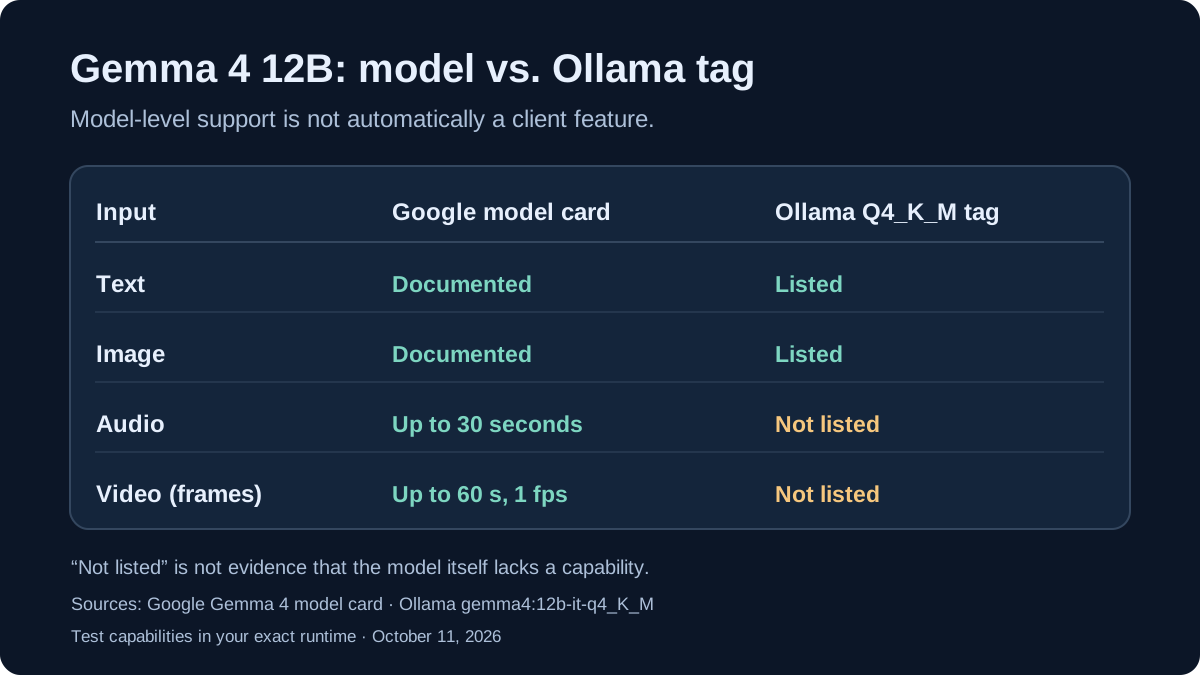
A model capability is not the same thing as an exposed local-client capability. Google’s Gemma 4 model card lists text, image and audio as inputs for the 12B Unified model, and describes video understanding via sequences of frames. The documented limits are 30 seconds of audio and 60 seconds of video at one frame per second. These describe the model’s reference workflow; they do not establish support for sending a video or audio file to an Ollama 12B tag. 123
Ollama’s 12B tag listing and its pinned Q4_K_M build explicitly list text and image input. They do not list audio or video input for that tag. This is not proof the underlying model cannot process those signals; it means the specific runtime and client implementation need to demonstrate the capability before users can depend on it.
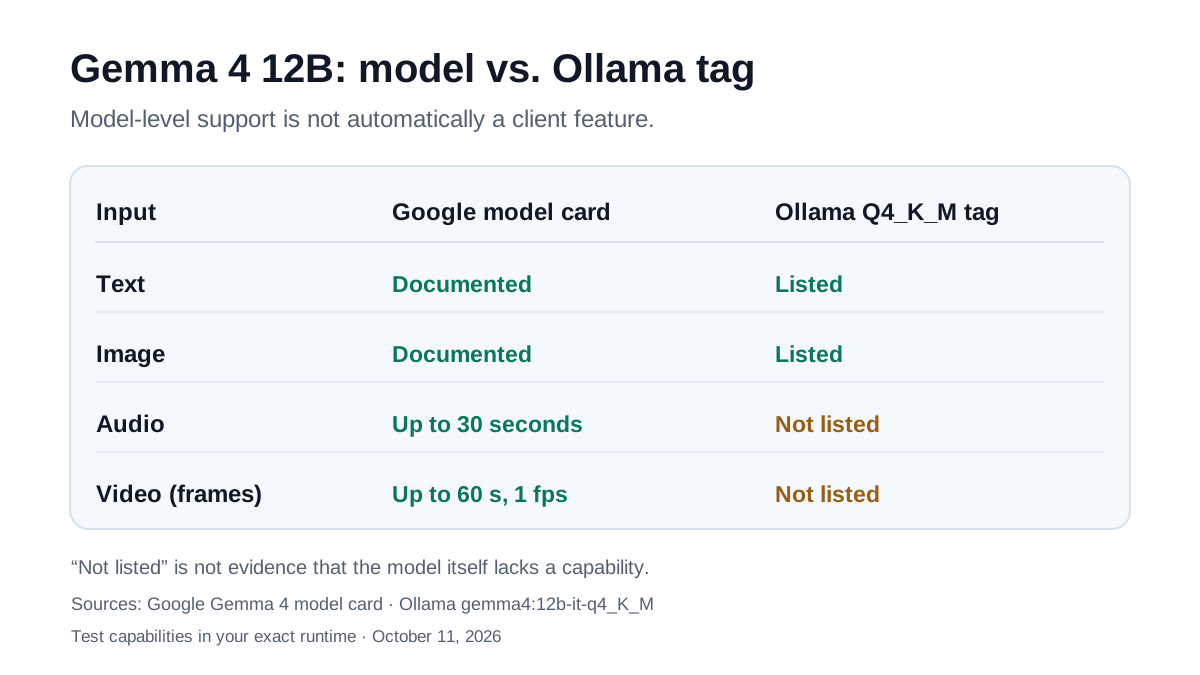
Test before processing private media: (1) Record the model and runtime versions with ollama --version and ollama show gemma4:12b-it-q4_K_M. (2) Start with a local image, which the tag explicitly documents. (3) Try audio/video only with a runtime that actually documents those input paths, and verify both its errors and the 30-/60-second reference limits. (4) Review that software’s data processing and network settings separately; the local loopback prompt in the script below does not itself call Google’s hosted API.
Google’s reference Transformers path uses AutoModelForMultimodalLM; the full-precision checkpoint is far larger than a local Q4 build and is not the default option for a 16 GB Mac.
How to read the benchmark table
Google publishes these instruction-tuned results for the 12B model: 2
| Benchmark | Gemma 4 12B | Gemma 4 26B A4B | Gemma 3 27B, no Thinking |
|---|---|---|---|
| MMLU Pro | 77.2% | 82.6% | 67.6% |
| AIME 2026, no tools | 77.5% | 88.3% | 20.8% |
| LiveCodeBench v6 | 72.0% | 77.1% | 29.1% |
| GPQA Diamond | 78.8% | 82.3% | 42.4% |
| MMMU Pro | 69.1% | 73.8% | 49.7% |
| MRCR v2, 128K | 43.4% | 44.1% | 13.5% |
These are vendor evaluations. They show that 12B is well above the small E-class and comes close to 26B A4B on some tests. They do not tell you tokens per second on a specific M4 or M5 Mac.
A repeatable 16GB / 24GB / 32GB Mac check
Ollama’s Q4_K_M tag page lists an 8.0GB model package, 11.9B parameters and build identifier 6114515d63c1 (checked October 11, 2026). Package size is not measured running RAM use. The tag fixes the quantization class, not an immutable artifact: record the model digest and Ollama version. On 16 GB start with short context and check memory pressure.
Step 1 – record the exact build. Install Ollama on macOS and run:
ollama --version
ollama pull gemma4:12b-it-q4_K_M
ollama show gemma4:12b-it-q4_K_M
ollama list
Record the Ollama version and model digest. A mutable default tag is not enough to reproduce a performance comparison months later.
Step 2 – measure the same local prompt. This script uses the Python standard library and the loopback Ollama API, with no external inference provider. Run it three times, then reduce the context from 8,192 to 4,096 tokens if your 16GB Mac shows heavy memory pressure.
python3 - <<'PY'
import json
from urllib.request import Request, urlopen

model = "gemma4:12b-it-q4_K_M"
prompt = "Explain with a concrete Python example how concurrent updates to shared mutable state can cause a race condition."
payload = {
    "model": model,
    "prompt": prompt,
    "stream": False,
    "keep_alive": "5m",
    "options": {"num_ctx": 8192, "temperature": 0},
}
request = Request(
    "http://127.0.0.1:11434/api/generate",
    data=json.dumps(payload).encode("utf-8"),
    headers={"Content-Type": "application/json"},
)
with urlopen(request, timeout=600) as response:
    data = json.load(response)
count = data.get("eval_count", 0)
seconds = data.get("eval_duration", 0) / 1e9
print("Output tokens:", count)
print("Prompt tokens:", data.get("prompt_eval_count", 0))
print("Prompt processing seconds:", round(data.get("prompt_eval_duration", 0) / 1e9, 2))
print("Model load seconds:", round(data.get("load_duration", 0) / 1e9, 2))
print("Decode tokens/s:", round(count / seconds, 1) if seconds else "n/a")
print("Total seconds:", round(data.get("total_duration", 0) / 1e9, 1))
print("Answer excerpt:", data.get("response", "")[:300])
PY
ollama ps
Step 3 – check reliability, not just tokens per second. In parallel, inspect Activity Monitor → Memory and record memory pressure and swap together with your Mac chip, unified-memory capacity, model digest, Ollama version, context size and whether the Python answer passes your own tests. eval_count / eval_duration measures decode throughput only; the script separately prints prompt_eval_count, prompt_eval_duration, and load_duration. total_duration is the overall request time including loading. The sample uses temperature: 0 for a bounded comparison, unlike Google’s recommended temperature=1.0 default; do not compare its results directly with vendor benchmark figures or sessions using different sampling. The meanings of those fields are documented in the Ollama Generate API. These are instructions for your measurements, not a claim that we ran the benchmark on a Mac.
Where 12B fits
Gemma 4 12B is a good match for local coding assistance, document analysis, OCR, screenshot/UI understanding and multilingual work when data should stay on the machine. At 24 to 32 GB, there is enough headroom to run the model alongside normal development tools without making memory management the main problem.
At 16 GB, 12B is a deliberate upper-midrange choice rather than a carefree default. E4B is lighter when responsiveness matters more than quality. With substantially more memory, compare 12B against 26B A4B or 31B instead.
Current Mac assessment
Gemma 4 12B is not a “small 12B that does everything,” and its 256K context limit does not make 256K locally practical by default. Its advantage is the combination of roughly 12B parameters, multimodal input and local Q4 builds around 8 GB. 26
It is viable on 16 GB with controlled context and background load, and noticeably more comfortable on 24 or 32 GB. For Mac users, that balance is often more useful than a larger model that scores better on paper but consumes most of the unified-memory pool.
Sources and evaluation boundaries
Architecture and benchmark claims come from Google; package sizes and available formats come from Ollama. Memory tiers are practical estimates rather than laboratory-verified Mac compatibility guarantees.
Footnotes
Frequently Asked Questions
Can Gemma 4 12B run on a Mac with 16 GB of unified memory?
Yes, with a 4-bit quantization and controlled context. Current Ollama variants are roughly 8 GB of model data, while macOS, the runtime and KV cache need additional memory.
How large is the context window?
Google documents up to 256K tokens for Gemma 4 12B Unified. That is a model limit, not a recommendation to use 256K on a 16 GB Mac.
Does Gemma 4 12B support audio and video?
Yes. Google documents text, image, audio and video input for the 12B Unified model. Runtime support still depends on the specific local implementation.
Ollama or MLX on a Mac?
Ollama is the simpler starting point. MLX is more useful when you want direct Python control, Apple-silicon-specific measurements or a particular quantization.
Is Gemma 4 12B a MoE model?
No. The 12B variant is a dense 11.95B model with 48 layers. The 26B A4B member of the family is the MoE model.